一:四者之间的关系
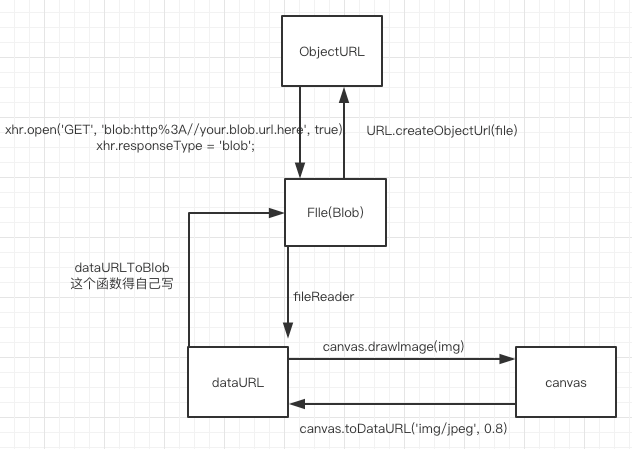
二:解释四者之间的关系
从File或者Blob转化为ObjectURL
1
2
objectURL = URL.createObjectURL(object);
// object:A File, Blob or MediaSource object to create an object URL for.从ObjectURL转Blob
1
2
3
4
5
6
7
8
9
10
11
var xhr = new XMLHttpRequest();
xhr.open('GET', 'blob:http%3A//your.blob.url.here', true);
xhr.responseType = 'blob';
xhr.onload = function(e) {
if (this.status == 200) {
var myBlob = this.response;
// myBlob is now the blob that the object URL pointed to.
}
};
xhr.send();
// 或者利用其他发请求的库也可以,主要是上面的xhr.responseType = 'blob';从 File转dataURL
使用 fileReader
1
2
3
4
5
6
7
8
9
10
11
12
13
function previewFile() {
var preview = document.querySelector('img');
var file = document.querySelector('input[type=file]').files[0];
var reader = new FileReader();
reader.addEventListener("load", function () {
preview.src = reader.result;
}, false);
if (file) {
reader.readAsDataURL(file);
}
}从dataURL转File(Blob)
1
2
3
4
5
6
7
8
9
10
11
12
13
14
15
16
17
18
19
20
21
22
23
24
function dataURItoBlob(dataURI) {
// convert base64/URLEncoded data component to raw binary data held in a string
var byteString;
if (dataURI.split(',')[0].indexOf('base64') >= 0)
byteString = atob(dataURI.split(',')[1]);
else
byteString = unescape(dataURI.split(',')[1]);
// separate out the mime component
var mimeString = dataURI.split(',')[0].split(':')[1].split(';')[0];
// write the bytes of the string to a typed array
var ia = new Uint8Array(byteString.length);
for (var i = 0; i < byteString.length; i++) {
ia[i] = byteString.charCodeAt(i);
}
return new Blob([ia], {type:mimeString});
}
// 使用方法如下
var dataURL = canvas.toDataURL('image/jpeg', 0.5);
var blob = dataURItoBlob(dataURL);
var fd = new FormData(document.forms[0]);
fd.append("canvasImage", blob);dataURL和canvas之间的转换比较简单,如图所示
canvas和File之间的转换需要经过dataRUL做中间人,暂时无法直接转化